As someone who has 2 Cricut machines and sold Cricut projects to pay off her car loan 1 year early and also pay off thousands of dollars in credit card debt, I eventually realized that selling on Etsy was not for me. My goal with selling on Etsy was to make money. I mean, why
If you’re trying to understand which Cricut machine to buy to start a Cricut business, this article is for you. There are currently 9 Cricut machines to choose from and they range in size and functionality. Depending on the type or Cricut projects you intend to make and sell, certain Cricut machines will work best
I love making shirts with my Cricut machine and I love shipping them off even more. In this article, I explain how to package and ship Cricut shirts using Etsy, Shopify and through your local post office or shipping carrier. I’ll assume that you already know how to make a shirt with your Cricut machine
Family reunions, class reunions, graduations, and bridal showers. What do these four things have in common? Besides being a time when people come together to celebrate, shirts are one thing these events have in common. People love personalized shirts for just about any and every event and if you want to sell large orders of
You’re reading this article because you want to know which Cricut projects are the most profitable. You've probably searched online and asked in Facebook groups about what the most profitable Cricut projects are to sell. Well, look no further because I have 31 profitable Cricut projects that you can sell listed below. These projects are
This month’s Cricut Business success story highlights Genovia in South Carolina. Shop name/year: Genovia is the Cricut business owner of Vivid Visions which she started in 2020. Platform/marketing: She currently sells her products in person and uses word of mouth, email, and business cards to promote her products. Items sold: The items she sells include
This month’s Cricut Business success story highlights Nicol in Texas. Shop name/year: Nicol is the Cricut business owner of AlmarParty6 which she started in 2022. Platform/marketing: She sells her products on Etsy and uses Instagram and Pinterest to promote her products. Items sold: The items she sells include cake toppers, cupcake toppers, favor boxes, banners,
This month’s Cricut Business success story highlights Maddy in California. Shop name/year: Maddy is the Cricut business owner of Shop Winnie and Me which she started in 2020. Platform/marketing: She sells her products on Etsy and her own Shopify website and uses Instagram to promote her products. Items sold: The items she sells include acrylic
Making money with your Cricut machine can be easy and the amount of money you can make with your Cricut machine can be huge. And that’s easier said than done. In this article, I outline the key ways to show you how to make your first $1,000 selling your Cricut creations. 1. Make sure your
If you’re just starting your Cricut business or you want to sell your Cricut creations for some additional money, you may want to set up a Cricut business website. A website helps you market your products and also makes it easy for customers to view products and submit their orders. Platforms like Shopify may be
As someone who has 2 Cricut machines and sold Cricut projects to pay off her car loan 1 year early and also pay off thousands of dollars in credit card debt, I eventually realized that selling on Etsy was not for me.
My goal with selling on Etsy was to make money. I mean, why else do people sell things?
I found myself better suited to sell my Cricut projects in other ways.
And let me first say that this article is not meant to dissuade you from selling on Etsy, it’s a look into my journey selling on Etsy.
I started selling on Etsy in 2018. My first Etsy shop was selling SVG files only. I enjoyed that process and I loved the passive income.
Eventually, I started selling the physical products I made with my Cricut machine. I created a second Etsy shop because I didn’t want to mix selling digital SVG files with selling physical products.
In the physical Etsy shop, I mostly sold confetti of various sizes, adhesive vinyl decals, and cake toppers, all made using my Cricut machines. These things were easy to make and didn’t require a lot of time.
Leaving Etsy
Negative reviews
I made the tough decision to close my digital SVG Etsy shop because of negative reviews from customers who didn’t know how to download and use SVG files, despite there being instructions with the SVG files.
Customer reviews have the power to encourage or discourage new customers from purchasing from you. When customers first land on your product listing, they will scroll through your pictures, maybe read the description, and then read the reviews for your Etsy shop.
If you have low stars and negative reviews, many customers will leave your product and go to another Etsy shop.
With Etsy, there is no way to delete or hide negative customer reviews, even if the customer is wrong.
The only thing you can do is reply to the customer offering an explanation, support, or a refund.
Let me say that I don’t think it would be a good strategy to delete all negative reviews because the shop owner needs to be made aware of issues that they can change.
However, when the issues that customers are complaining about are due to their lack of knowledge and understanding, this penalizes the shop owner.
Now, there are plenty of Etsy shops that sell SVG files, have great reviews, and have lots of sales. I acknowledge that and I will say that you have to look at that shop as a whole.
Look at how long they’ve been on Etsy, how many products they have in their shop, and look at their reviews. If you go through the entirety of their reviews, I’m sure somewhere down the line, they have low stars, but as they keep selling SVG files, the positive reviews override the negatives.
So, in that case, it is a matter of perseverance and great customer service for the Etsy shop owner.
I chose not to persevere on Etsy, but go elsewhere to sell my SVG files. I’ll get to that a few paragraphs down.
You may be wondering about my Etsy shop where I sell physical Cricut projects. I still have that Etsy shop and it has great reviews, but I mostly sell through other ways which I’ll get to a few paragraphs down.
If a customer types in “personalized baby blanket” in the Etsy search, not only will they see results from handcrafters like yourself who may use HTV, embroidery, sublimation, or some other form to create the baby blankets, they will likely see results from companies that mass produce personalized baby blankets.
So no longer are you competing against individuals who run Etsy shops, you’re competing against companies that have more manpower than you do and who can make the exact product you’re making in less time and for a cheaper price.
So now you’re ready for the answers to why I stopped selling on Etsy, where I sell today, and how it’s different from selling on Etsy.
I currently sell my SVG files and physical Cricut projects on my Shopify store. I still have my physical Etsy shop that brings in a few sales per month.
I decided to stop selling on Etsy for several reasons including:
Etsy changes its algorithm every so often and you can go from making many sales to only making a handful of sales overnight.
There’s not much customization that you can do to your Etsy shop, including Etsy subscription platforms.
Etsy’s fees start to eat into your profits and their fees continue to increase.
You can’t really build a brand on Etsy. Most people who order on Etsy don’t remember the shop name, they just say “I got it on Etsy”.
Etsy shows the products of other shop owners at the bottom of your product listings, therefore Etsy doesn’t care who the customer buys from, they just want the customer to make a purchase on the platform.
I knew I wanted to work with businesses and nonprofits and wanted to present my business as being “professional” but only having an Etsy shop and not a standalone website would make it look more like a hobby.
You can’t offer extensive customized forms to allow customers to easily enter their personalization for an order.
You can’t get rid of negative comments that have nothing to do with your product or service.
Etsy makes it hard for you to email your customers and build your own email list.
I decided to sell my products on Shopify for several reasons including:
I don’t have to worry about Etsy changing their algorithm and messing up my sales
I built up my Cricut business to where I could afford to pay the monthly Shopify fee
I’m able to send people directly to my Shopify store and they can browse my products instead of seeing products from thousands of other Etsy shops
My online store looks more professional and I can build my website to look how I want it
I work with businesses and nonprofits because they see my business as a business and not a hobby where I sell on Etsy
I can create customized forms that allow customers to enter their customizations for orders easily
I can control which reviews are posted on products
I can email my customers to stay in front of them to market new products
I can run Google ads and social media ads on my store
In summary, I think Etsy is a great place to get started selling your Cricut projects to make money, but I don’t think that should be the only place you sell your Cricut projects.
If and when you can afford to, I encourage you to subscribe to Shopify or Squarespace to start selling your Cricut projects for the reasons I listed above.
Again, Etsy is perfect because the price to get started on Etsy is very low, but please don’t put all of your eggs in the Etsy basket. One change of their algorithm and you can go from making lots of sales to only a handful.
If you’re ready to set up your Etsy shop or Shopify store, schedule a FREE 15-minute coaching call with me so we can put together a quick action plan for you.
Which Cricut Machine Should I Buy?
If you’re trying to understand which Cricut machine to buy to start a Cricut business, this article is for you.
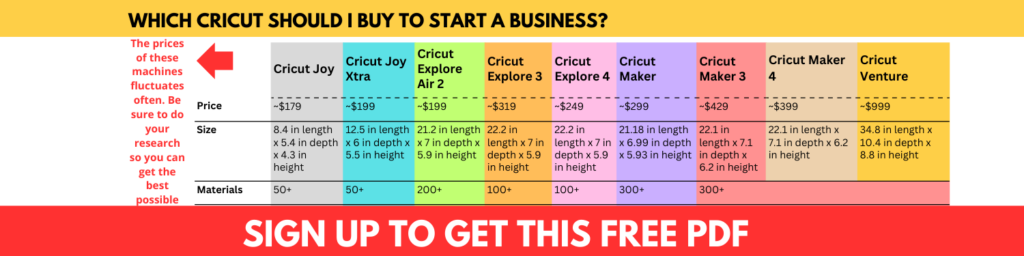
There are currently 9 Cricut machines to choose from and they range in size and functionality.
Depending on the type or Cricut projects you intend to make and sell, certain Cricut machines will work best for you.
For each of the 9 Cricut machines, I list the price, size, what it can do, # of materials it can cut, and why it’s worth starting a small business with each Cricut machine.
Before we jump into this article, sign up to get Cricut business advice in your inbox.
Start a Cricut business with a Cricut Joy
Price
The regular price of a Cricut Joy is about $179, but you can often catch it on sale at Amazon, Walmart or the Cricut website.
Size
The Cricut Joy is the smallest of all Cricut machines at 8.4 in length x 5.4 in depth x 4.3 in height.
What it can do
The Cricut Joy can cut, write, draw, and foil. The Cricut Joy cannot print then cut.
Yes, the Cricut Joy can cut Cricut Smart Materials without a mat.
Why start a small business with a Cricut Joy machine?
Need smaller machine for smaller space
Want to use Smart Materials without cutting mat
Don’t intend to cut larger projects
Don’t intend to score, engrave, deboss, perforate, or print then cut
Start a Cricut business with a Cricut Joy Xtra
Price
The Cricut Joy Xtra is one of the newest Cricut machines and regular price is about $199, but you can catch this machine on sale every so often.
Size
The Cricut Joy Xtra is the second smallest Cricut machine at 12.5 in length x 6 in depth x 5.5 in height.
What it can do
The Cricut Joy Xtra can cut, write, draw, foil, and print then cut.
Materials it can cut
The Cricut Joy Xtra can be used with 50+ materials.
Can it cut Cricut Smart Materials without a mat?
Yes, the Cricut Joy Xtra can use Cricut smart materials without a mat.
Why start a small business with a Cricut Joy Xtra?
Need smaller machine but bigger than the Cricut Joy
Want to use Smart Materials without cutting mat
Don’t intend to cut larger projects
Want to print then cut
Don’t intend to score, engrave, deboss, or perforate
If you want to make your own Cricut business cards, watch the video below.
Start a Cricut business with a Cricut Explore Air 2
Price
The Cricut Explore Air 2 regularly costs about $199, and is cheaper than the standard size Cricut machines.
I have the Cricut Explore Air 2 and I love it.
Size
The Cricut Explore Air 2 is a standard size Cricut machine at 21.2 in length x 7 in depth x 5.9 in height, which means it can cut larger projects than the Cricut Joy or Cricut Joy Xtra.
What it can do
The Cricut Explore Air 2 can cut, write, draw, foil, score, and print then cut.
The Cricut Explore Air 2 cannot print then cut on glossy paper, but you can use a hack every time you want to use glossy paper with your Cricut Explore Air 2.
Materials it can cut
The Cricut Explore Air 2 can be used with 200+ materials.
Can it cut Cricut Smart Materials without a mat?
The Cricut Explore Air 2 cannot cut Cricut smart materials without a mat. However, if you still want to use Cricut smart materials with your Cricut Explore Air 2, you will need to use a cutting mat.
Why start a small business with a Cricut Explore Air 2?
The Cricut Explore 3 is regularly priced at around $319.
Size
The Cricut Explore 3 is a standard-size Cricut machine at 22.2 in length x 7 in depth x 5.9 in height, which is only 1 inch longer than a Cricut Explore Air 2 machine.
What it can do
Like the Cricut Explore Air 2, the Cricut Explore 3 can also cut, write, draw, foil, score, and print then cut.
Materials it can cut
The Cricut Explore 3 can also be used with 100+ materials.
Can it cut Cricut Smart Materials without a mat?
The Cricut Explore 3 can cut Cricut Smart Materials without a cutting mat, unlike the Cricut Explore Air 2.
Price: The Cricut Explore 4 is priced at $249.99.
Size: The machine measures approximately 22.2 in x 7 in x 5.9 inches and weighs around 11.1 pounds.
What it can do: The Cricut Explore 4 can cut, write, and draw. It supports over 100 materials, including vinyl, cardstock, and iron-on.
Materials it can cut: Compatible with 100+ materials such as vinyl, cardstock, iron-on, and more.
Can it cut Cricut Smart Materials without a mat?Yes, the Explore 4 is compatible with Cricut Smart Materials, allowing matless cutting for materials up to 12 feet in length.
Why start a small business with a Cricut Explore 4?
Ideal for entrepreneurs focusing on custom apparel, decals, and paper crafts.
Faster cutting speeds enhance productivity, enabling quicker order fulfillment.
Smart Materials compatibility simplifies the crafting process, reducing setup time.
Affordable entry point for those starting a Cricut-based business.
Start a Cricut business with a Cricut Maker
Price
The regular price of the Cricut Maker is around $299.
Size
The Cricut Maker is almost the same size as the Cricut Explore Air 2 and Cricut Explore 3 at 21.18 in length x 6.99 in depth x 5.93 in height.
What it can do
The Cricut Maker can cut, write, draw, foil, score, engrave, deboss, perforate and print then cut. The Cricut Maker can print then cut on glossy paper.
The Cricut Maker is also much faster than the Cricut Explore Air 2 machine.
Materials it can cut
The Cricut Maker can be used with over 300 materials.
Can it cut Cricut Smart Materials without a mat?
No, the Cricut Maker cannot cut Cricut smart materials without a mat. You will need to use a cutting mat to use smart materials with a Cricut Maker machine.
Why start a small business with a Cricut Maker machine?
Does more than a Cricut Explore and Cricut Joy machines
Cut over 300 materials
Cut, write, draw, foil, score, engrave, deboss, perforate, and print then cut
The size of the Cricut Maker 3 is very similar to the Cricut Explore machines and the Cricut Maker at 22.1 in length x 7.1 in depth x 6.2 in height.
What it can do
The Cricut Maker 3 can cut, write, draw, foil, score, engrave, deboss, perforate, and print then cut. The Cricut Maker 3 can print then cut on glossy paper.
Materials it can cut
The Cricut Maker 3 can be used with more than 300 materials.
Can it cut Cricut Smart Materials without a mat?
Yes, the Cricut Maker 3 can cut Cricut Smart Materials without a cutting mat.
Why start a small business with a Cricut Maker 3?
Want to use Smart Materials without cutting mat
Cut over 300 materials
Cut, write, draw, foil, score, engrave, deboss, perforate, and print then cut
Price: The Cricut Maker 4 is available at $399.99.
Size: The machine dimensions are approximately 22.6 x 6.2 x 7 inches, with a weight of about 18 pounds.
What it can do: The Maker 4 offers cutting, writing, drawing, scoring, debossing, engraving, and more. It supports over 300 materials, including fabric, leather, and balsa wood.
Materials it can cut: Compatible with 300+ materials, ranging from delicate fabrics to tough materials like leather and chipboard.
Can it cut Cricut Smart Materials without a mat? Yes, the Maker 4 supports matless cutting with Cricut Smart Materials, accommodating cuts up to 12 feet long.
Why start a small business with a Cricut Maker 4?
Perfect for businesses offering a diverse range of products, from intricate paper crafts to custom leather goods.
Enhanced cutting speed and precision improve efficiency and product quality.
Versatility in material compatibility allows for expanded product offerings.
Advanced tools enable the creation of professional-grade items, appealing to a broader customer base.
Start a Cricut business with a Cricut Venture
Price
The Cricut Ventue is one of the latest Cricut machines and costs about $999 regularly.
Size
The Cricut Venture is the largest Cricut machine at 34.8 in length x 10.4 in depth x 8.8 in height.
What it can do
The Cricut Venture can cut, write, draw, foil, and score.
Materials it can cut
The Cricut Venture can be used with over 100 materials.
Can it cut Cricut Smart Materials without a mat?
Yes, the Cricut Venture can cut Cricut Smart Materials without a mat.
Why start a small business with a Cricut Venture?
Larger machine to “mass produce” projects
Cut larger projects
I hope you feel more informed about Which Cricut You Should Buy To Start A Cricut Business.
My personal recommendation for anyone trying to decide which Cricut machine to buy for their Cricut business is to get the Cricut Maker 3. I’ve had my Cricut Maker 3 since March 2022 and I used it to make a variety of things in my Cricut business including shirts, stickers, cake toppers, acrylic keychains, acrylic signs, wood signs and so much more.
Now it’s time to package your Cricut shirt so you can ship it using the instructions below for Etsy, Shopify, and your local post office or shipping carrier.
Congrats on selling a Cricut shirt through Etsy. It can be hard to stand out on Etsy, but congrats on doing it. People are finding your products. Here are the steps to package and ship your Cricut shirts:
Go to Shop Manager.
Click Orders and Shipping.
Click on the order for which you want to print the receipt.
Click the 3 dots in the bottom right corner and click Packaging Slip or Order Receipt.
A new tab may open with a PDF for you to print.
Put the shirt, customer order page, and thank you/coupon code inside the plastic bag.
Add any additional touches to the bag such as stickers, magnets, etc.
Back on the Orders and Shipping page, click on the order and click the icon of the van.
Enter the details of your package including the weight and size.
From the list of shipping carrier options, choose the one that suits your needs. This is where you’re choosing how much to pay for the shipping label and who will ship the package for you. Etsy will bill you for the amount of the shipping label you choose.
Review your purchase and then click Purchase.
A screen will pop up and you will click Print shipping labels. On this screen is also the option to print packing slips.
Your shipping label will open in another tab.
Put your shipping label paper in your printer and then click print on your device screen.
Take your printed shipping label and add it to your package.
The customer will automatically receive an email notification saying that their order is on the way. They will also receive the tracking number so they can track their package.
Drop the package off at the location of the shipping carrier that you chose.
Watch the video below on how I package and ship an Etsy order.
Packaging and shipping a Cricut shirt using Shopify
Congrats on selling a Cricut shirt through your Shopify site. This means that people are finding your website online or you’re directing people to your online store. Here are the steps to package and ship your Cricut shirts:
In Shopify, click on the order for which you want to print the receipt.
Click More Actions and then click Print Order Page or Print Packing Slips.
A window will pop up for you to print the order page or packing slip.
Put the customer order page, shirt, and thank you/coupon code inside the plastic bag.
Add any additional freebies to the bag such as stickers, magnets, etc.
Enter the details of your package including the weight and size.
From the list of shipping carrier options, choose the one that suits your needs. This is where you’re choosing how much to pay for the shipping label and who will ship the package for you. Shopify will bill you for the amount of the shipping label you choose.
Click Buy Shipping Lable and the label will open in another tab.
Put your shipping label paper in your printer and then click print on your device screen.
Take your printed shipping label and add it to your package.
The customer will automatically receive an email notification saying that their order has been shipped. They will also receive the tracking number so they can track their package.
Drop the package off at the location of the shipping carrier that you chose.
Packaging and shipping a Cricut shirt through post office
Congrats on selling a Cricut shirt through word of mouth or networking events. While selling this way works for a little while and if selling is a hobby to you, if you want to expand and make more income, you’ll eventually need to set up a website or Etsy shop.
Here are the steps to package and ship your Cricut shirts:
Put the shirt, customer receipt, and thank you/coupon code inside the plastic bag.
Add any additional touches to the bag such as stickers, magnets, etc.
Write down the customer’s shipping info on a sheet of paper
Pack up your car and head to the post office or shipping carrier.
Once at the post office, you can use the shipping labels that they provide to write the customer’s shipping info and your shipping info.
When you’re at the counter speaking with the shipping teller, they will weigh the package and ask you to confirm both addresses.
They will then give you multiple shipping options with some being cheaper than others.
Choose which shipping option you want and pay for the shipping.
You will receive a receipt that has a tracking number on it. You can email this tracking number to the customer so they can track their order.
I hope you enjoyed this tutorial on how to package and ship Cricut shirts.
Feel free to email or message me on social media if you have questions or comments.
Sell Your Cricut Shirts For These 4 Events
Family reunions, class reunions, graduations, and bridal showers.
What do these four things have in common?
Besides being a time when people come together to celebrate, shirts are one thing these events have in common.
People love personalized shirts for just about any and every event and if you want to sell large orders of shirts using your Cricut machine, you want to take advantage of these four events.
You can go the route of selling one shirt here and there, but with these four events, you can sell lots of shirts at one time without having to do a lot of marketing.
Read to the end to learn my favorite tips for making and selling Cricut shirts in bulk and also to get your questions answered about the profitability of selling shirts made with your Cricut.
Selling Cricut shirts for family reunions
Family reunions are the time of the year when families unite to catch up and reflect on memories.
This year I attended a family reunion (the first in over 20 years) and it was a joy to see family members that I hadn’t seen in years and others I had never met before.
I also had the pleasure of making the shirts for the family reunion and my process was super simple. I set up the process online, set a deadline, and closed the online form to allow myself plenty of time to order and make the shirts.
Regardless of whether the family reunion is a small or large gathering, it’s a way for you to easily and quickly make a large sum of money.
Class reunions are very similar to family reunions.
A small or large group of people are coming together to catch up and reflect on old times.
A personalized shirt shows unity and makes for a great photo op.
Also in the years down the road, classmates will pull up their shirts and remember the good times and that class reunion Facebook group is once again active.
Selling Cricut shirts for graduation
Graduation shirts are perfect to help the graduate identify their family in a crowd (if they have on distinct bright color shirts) and it also allows others to see the huge amount of support for the graduate.
Add the graduate’s name, a funny/clever phrase or a picture to the shirts.
Selling Cricut shirts for bridal showers
Brides sometimes go over and beyond for their bridal showers and what’s one simple and inexpensive gift they can give to their bridesmaids? Shirts.
Scroll through Etsy to take a look at the many different bridesmaid’s shirts and then go and sell some in your community.
Connect with local venues that host weddings and other wedding-related businesses and give them your business card so they can think about you and promote your business to their brides.
Supplies needed to make Cricut shirts
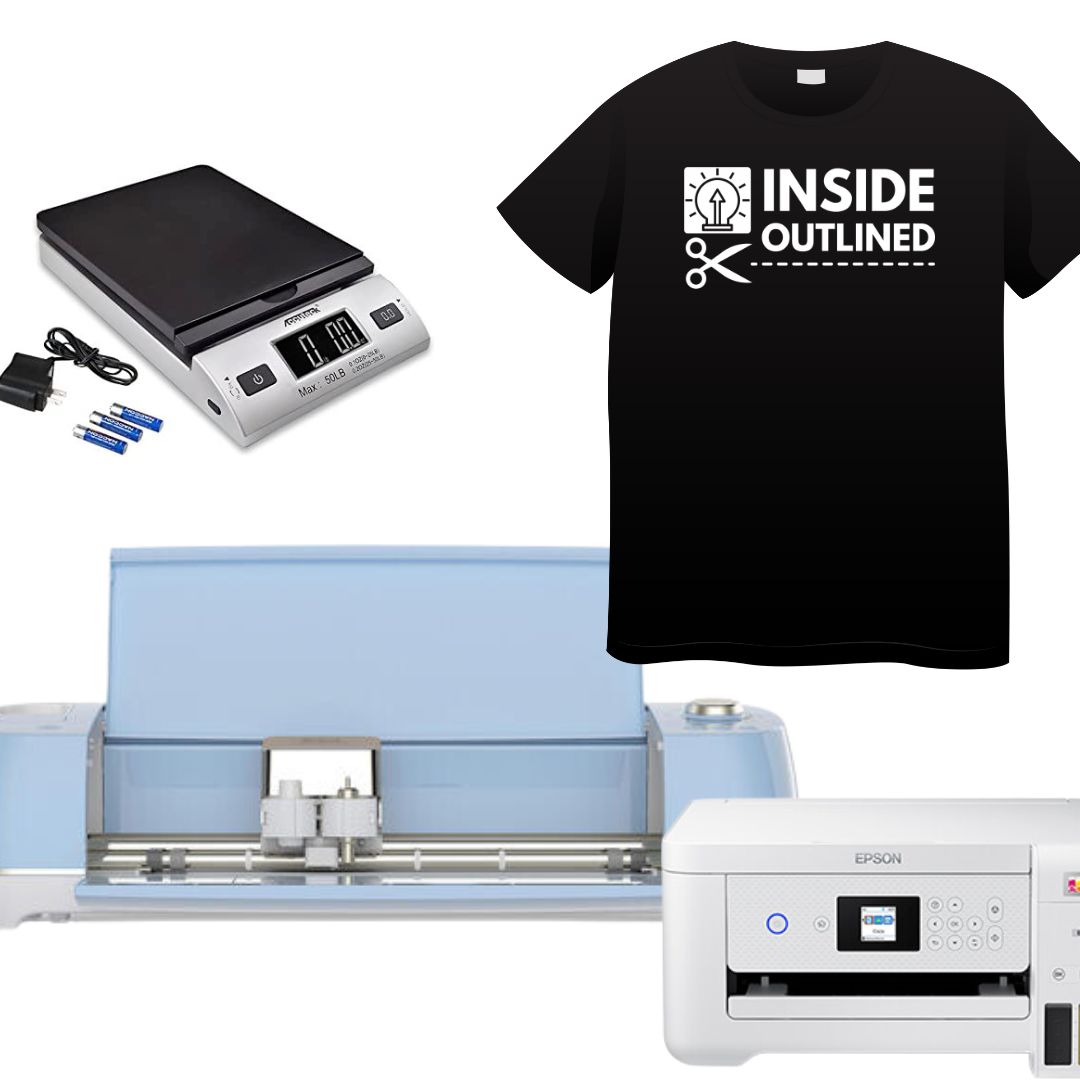
You need the following supplies to make your Cricut shirts:
Offer 3-5 design options that don’t have super tiny details and aren’t complex (buy a few designs on Etsy or make your own)
Stick with only 1 color HTV, offering multiple colors is very time-consuming for large orders of shirts
Only offer 1 or 2 shirt color options so you know you can find the specific color or you can buy the shirts online at Jiffyshirts.com
Offer the option for customers to provide the shirts to you (be sure you have an online, timestamped way to track how many shirts were provided to you)
Break your crafting days into phases – cut all designs on one day, weed them on another day, and apply to shirts on the last day
Outsource the shirt designs to be printed on direct-to-film (DTF) and just press them on the shirts (this is what I did for my family reunion shirts)
Tips to market Cricut shirts in bulk for free
Create mockups in Canva for potential family reunion shirts
You have to beware of the peel instructions on your iron-on or HTV. Different brands and types of iron-on/HTV have different peel instructions.
Some Cricut brand iron-on vinyl has a cold/cool peeling meaning you have to wait for the clear plastic to cool down before you can peel it off.
Other brands are warm/hot peel meaning you can peel the clear plastic off when it’s warm enough for you to do so without burning yourself.
Always be sure to check the peel instructions of your iron-on/HTV.
Also, if you don’t remember the peel instructions for your iron-on/HTV and if your iron-on vinyl won’t stick, press it again and let the clear plastic cool before peeling it off.
How to sell your Cricut shirts?
I recommend selling your Cricut shirts online through a platform such as Google Forms, Jotform, Google Sites, Neartail or Shopify. When you have an online way to take customer orders, this allows you to digitally accept orders from all over the world and customers receive a digital receipt.
You can also reach out to family, friends, schools, local small businesses, etc. to sell your shirts.
Is it expensive to sell shirts made with a Cricut?
Selling shirts made with your Cricut doesn’t have to be expensive especially if you price your shirts correctly. Here’s an example. You buy 5 blank shirts for $4 each and a roll of Cricut iron-on vinyl for $12. You already have a heat press and Teflon sheet.
Because of the design you are using, you are able to make all 5 shirts out of the 1 roll of Cricut iron-on vinyl. So, the total cost of your materials is $16.
Now let’s say that you make the shirts and sell each one for $17. You just made $85. When you subtract the cost of your supplies (the 5 shirts and roll of iron-on vinyl) from the $85, your profit is $69 which, in my opinion, is pretty good.
So, while it cost you $3.20 to make each shirt ($16/5), you made $13.80 in profit for each shirt ($69/5).
Other expenses that will make your profit go down are if you buy additional packaging that will increase the cost of your supplies.
So be sure to keep all of your expenses low, but your quality high when selling Cricut shirts.
As shown in the example above, selling shirts can be a profitable Cricut business and the average profit per shirt made with your Cricut machine can be high. In my opinion, your average profit per shirt should be a minimum of $10 if you’re selling individual shirts. If you’re selling bulk shirts, your average profit per shirt should be more than $7 per shirt.
Again, your profit is the amount you have left after all expenses.
How much should you sell your Cricut shirts for?
The amount you sell your Cricut shirts for will vary based on the number of shirts you’re making and the cost of the supplies. You should also price your shirts based on how much profit you want to make for each shirt.
You should purchase the Cricut Pricing Spreadsheet to automatically calculate how much you should charge for your shirts.
Cricut shirts and also determine what your profit will be for your shirts.
Here are a few things to consider when selling your Cricut shirts.
If the customer wants designs on the front and back of their shirts, charge a few extra dollars per shirt
If the customer wants multiple colors in their design, charge a few extra dollars per shirt
Can you start a shirt business with a Cricut
Yes, you can start a shirt business with your Cricut machine.
In my opinion, there are three types of Cricut shirt businesses you can start.
You sell designs that you think are trendy and think people will buy.
You take custom orders for people who want shirts designed a certain way.
A combination of 1 and 2.
All options have pros and cons and you must weigh and test them to see what the best option is for you.
I know this article was filled with a lot of good info and I hope it was helpful to you. Send me an email or message to let me know what other events you take advantage of to sell your Cricut shirts.
31 Most Profitable Cricut Projects to Sell
You’re reading this article because you want to know which Cricut projects are the most profitable.
You’ve probably searched online and asked in Facebook groups about what the most profitable Cricut projects are to sell.
Well, look no further because I have 31 profitable Cricut projects that you can sell listed below. These projects are listed alphabetically and for each one, I list why they’re profitable, where to get your Cricut blanks, hacks you can use when making these projects, and the approximate profit margin.
Considerations upfront
Before jumping into the actual profitable Cricut projects, you need to consider the cost of materials, shipping, the time it takes to make items, and the popularity of items.
As I always mention, you start a business to make money and if all the components don’t add up to equal profits, then you need to change something in your equation. Your profit margin is the amount of money you will make after all expenses have been subtracted from what you sold the product for.
If the cost of your materials is eating into your profits, look for ways to get cheaper, high-quality supplies.
If shipping costs too much, look for a different shipping company or reconsider how you package items to make them weigh less if possible.
If it takes too long to make an item, that will definitely eat into your profitability. Either figure out how to make the item faster, increase the price of the item or get rid of it altogether.
You must consider the popularity of the items that you sell. Remember when pop-its were all the rage? What about LOL dolls? Although some trends come and go, you should definitely be aware of the trends and find ways to capitalize on them.
Now, let’s jump into the 31 most profitable Cricut projects to sell.
Acrylic keychains
Why: Acrylic keychains are super inexpensive and are trendy.
Where to get items: Amazon, Hobby Lobby, Michaels, etc.
Hack: Apply vinyl to the keychain or print and cut then design and seal with resin.
Profit margin: $7 per item
Acrylic signs
Why: You can buy them inexpensively and sell them for a good profit. You can target wedding planners and wedding venues for your marketing efforts.
Where to get items: Home Depot, Lowe’s, Michaels, etc.
Hack: If you set up at vendor fairs, put your logo on a big acrylic sign and you can be sure people will ask about it.
Profit margin: $20+ per sign
Aprons
Why: You can buy them inexpensively and sell them for a good profit. You can target chefs who host cooking classes for your marketing efforts.
Where to get items: Amazon, Hobby Lobby, Michaels, etc.
Hack: Try offering a set number of aprons at a discounted rate for specific audiences such as chefs or local restaurants, etc.
Profit margin: $10+ per apron
Banners
Why: As mentioned before, people love to celebrate with personalized items, so add banners to your product list.
Where to get items: Amazon, Dollar Tree, Hobby Lobby, Michaels, etc.
Hack: Create product bundles by offering banners, cake toppers, and other items in a bundle.
Profit margin: $10+ per banner
Bourbon glasses
Why: Bourbon glasses make perfect gifts for the best man at a wedding or for groomsmen boxes.
Where to get items: Amazon, Hobby Lobby, Michaels, etc.
Hack: Sell bourbon glasses individually or as a set.
Profit margin: $10+ per item
Cake toppers
Why: People love to celebrate with cake so help them personalize their celebration with a personalized cake topper.
Where to get items: Amazon, Dollar Tree, Hobby Lobby, Michaels, etc.
Hack: Look on Etsy to see what type of cake toppers trend the most.
Profit margin: $10+ per cake topper
Coasters
Why: You can buy them in bulk for a decent price.
Where to get items: Amazon, Hobby Lobby, Michaels, etc.
Hack: Print and cut your design in the same shape as the ceramic coaster and use resin to seal your coasters.
Profit margin: $5+ per item
Cutting boards
Why: Personalized cutting boards add a lively touch to any kitchen.
Where to get items: Amazon, Hobby Lobby, Ikea, Walmart, etc.
Hack: Buy cutting boards that already have designs and personalize them.
Why: You can buy vinyl in bulk and sell the finished product for a good profit.
Where to get items: Amazon, Hobby Lobby, Michaels, etc.
Hack: Buy vinyl colors that are popular and trending such as holographic and metallic gold.
Profit margin: $10+ per decal
Felt flowers
Why: Just like with paper flowers, felt flowers are long-lasting and they still look real. Search online to see the trend.
Where to get items: Amazon, Hobby Lobby, Michaels, etc.
Hack: Offer a variety of felt flower options and you can even dye your own felt to make exotic colors.
Profit margin: $20+ per item
Gift boxes
Click the image above to watch the video.
Why: There’s always something to celebrate and you can use your Cricut to help customers elevate their gift boxes.
Where to get items: Amazon, Dollar Tree, Hobby Lobby, Michaels, etc.
Hack: Add names or sayings to boxes and offer a variety of vinyl colors.
Profit margin: $10+ per item
If you’re enjoying this article on the 31 most profitable Cricut projects to sell, sign up for my Cricut business email list to get more tips on selling your Cricut projects.
Kitchen towels
Why: Kitchen towels are a necessity and when personalized, they liven up a kitchen.
Where to get items: Amazon, Dollar Tree, Hobby Lobby, Michaels, etc.
Hack: Add your own funny sayings to kitchen towels, allow customers to personalize them or us a combination of both.
Profit margin: $7+ per item
Makeup bags
Why: You can buy them inexpensively and sell them for a good profit. You can target specific audiences such as those looking for Sweet 16 gifts, etc.
Where to get items: Amazon, Hobby Lobby, Michaels, etc.
Hack: Try offering a set number of bags at a discounted rate for specific audiences such as teen birthday party favors, etc.
Profit margin: $5+ per bag
Mugs/tumblers
Why: People love personalized mugs and tumblers so get on this trend.
Where to get items: Amazon, Hobby Lobby, Ikea, Michaels, etc.
Hack: To upsell your mugs and tumblers, add vinyl to them in addition to glitter and epoxy/resin to seal the design. You can also sublimate your mugs/tumblers.
Profit margin: $10+ per item
Nursery milestone blankets
Why: These blankets are trendy and are a cute way to celebrate the growth of babies
Where to get items: Amazon, Hobby Lobby, Michaels, etc.
Hack: Buy pre-made milestone blankets and personalize them by adding the name the customer wants.
Why: Oven mitts are inexpensive and are always handy in the kitchen.
Where to get items: Amazon, Dollar Tree, Hobby Lobby, Michaels, etc.
Hack: Stock up on oven mitts at Dollar Tree.
Profit margin: $7+ per set
Paper flowers
Why: Paper flowers are popular and they last longer than real flowers.
Where to get items: Amazon, Hobby Lobby, Michaels, etc.
Hack: Buy a variety of paper flower templates online and see which ones you like to make the best.
Profit margin: $20+ per item
Party favor boxes
Why: Research shows that kids parties in particular are getting more and more elaborate and unique, so there is plenty of opportunity to sell your party favor boxes.
Where to get items: Amazon, Hobby Lobby, Michaels, etc.
Hack: Use the Cricut print and cut feature and a combination of printed paper to make your boxes come alive.
Profit margin: $5+ per item
Pencil pouch
Why: You can buy them inexpensively and sell them for a good profit. You can target the back to school holiday for your marketing efforts.
Where to get items: Amazon, Hobby Lobby, Michaels, etc.
Hack: Try offering a set number of bags at a discounted rate for specific audiences such as teachers, parents, etc.
Profit margin: $5+per pouch
Pillow covers
Click the image above to watch the video.
Why: Pillow covers are inexpensive and add personality to any room.
Where to get items: Amazon, Hobby Lobby, Michaels, etc.
Hack: Create pillow covers designs based on seasons/holidays. You can also personalize them.
Profit margin: $7+ per item
Round door signs
Why: Round door signs continue to trend and can be personalized for any season or holiday.
Where to get items: Amazon, Hobby Lobby, Home Depot, Lowe’s, Michaels, etc.
Hack: Offer 1-2 color options and paint/stain your door signs in advance.
Profit margin: $15+ per item
Shirts, onesies
Why: You can buy them inexpensively and sell them for a good profit.
Where to get items: Amazon, Hobby Lobby, Michaels, etc.
Hack: For bulk orders or designs that you sell, outsource the design if you can, so you don’t have to cut and weed everything. If outsourcing will eat into your profits, don’t do it.
Profit margin: $10+ per shirt
If you’re enjoying this article on the 31 most profitable Cricut projects to sell, sign up for my Cricut business email list to get more tips on selling your Cricut projects.
Shot glasses
Why: Shot glasses also make perfect gifts for the best man at a wedding or for groomsmen boxes.
Where to get items: Amazon, Dollar Tree, Hobby Lobby, Michaels, etc.
Hack: Sell shot glasses individually or as a set.
Profit margin: $5+ per item
Stickers
Why: Sticker paper can be bought in bulk and selling stickers doesn’t require a lot of physical work.
Where to get items: Amazon, Hobby Lobby, Michaels, Walmart, etc.
Hack: Sell stickers that you design or allow customers to submit their own sticker ideas.
Profit margin: $5+ per item
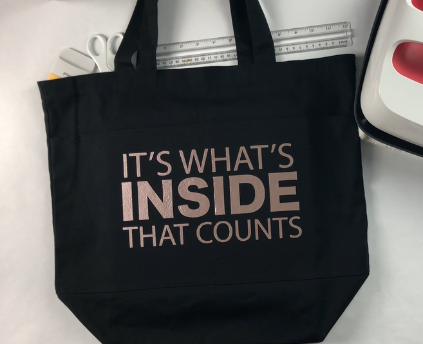
Tote bags
Click the image above to watch this video.
Why: You can buy them inexpensively and sell them for a good profit. You can target specific audiences such as bridal parties, etc.
Where to get items: Amazon, Hobby Lobby, Michaels, etc.
Hack: Try offering a set number of bags at a discounted rate for specific audiences such as bridal parties.
Profit margin: $10+ per bag
Wall art
Why: You can buy materials inexpensively and sell the finished product for a good profit.
Where to get items: Amazon, Hobby Lobby, Michaels, etc.
Hack: You can print and cut your design or add vinyl to your wall art.
Profit margin: $5+ per item
Wall decals
Why: Vinyl can be bought in bulk wall decals are becoming increasingly popular.
Where to get items: Amazon, Expressions Vinyl, Hobby Lobby, Michaels, MyVinyl Direct etc.
Hack: Sell a variety of decal sizes and colors to increase your profits.
Profit margin: $10+ per decal
Wedding hangers
Why: Wedding bells ring all year long, and a personalized wedding hanger makes the dress or tux that much more special.
Where to get items: Amazon, Hobby Lobby, Michaels, etc.
Hack: Sell individual or sets of hangers.
Profit margin: $10+ per item
Wedding robes
Why: For bachelorette parties or as gifts to the bridal party, personalized wedding robes will be the perfect thank you gift.
Where to get items: Amazon, Hobby Lobby, Michaels, etc.
Hack: Sell individual or sets of robes.
Profit margin: $10+ per item
Wine glasses
Why: Wine glasses are inexpensive and you can find them just about anywhere. When you add personalization to them, you can get great profit margins.
Where to get items: Amazon, Dollar Tree, Hobby Lobby, Ikea, Michaels, Walmart, etc.
Hack: You can etch glasses with etching cream or add vinyl to them.
Profit margin: $10+ per item
Wood signs
Why: You can buy them inexpensively and sell them for a good profit.
Where to get items: Home Depot, Lowe’s, Michaels, etc.
Hack: If you offer only 1 color, go ahead and paint or stain all of your wood in advance.
Profit margin: $15+ per sign
If you’re enjoying this article on the 31 most profitable Cricut projects to sell, sign up for my Cricut business email list to get more tips on selling your Cricut projects.
I recommend starting with 4-5 evergreen items and adding a seasonal spin to them – if you sell shirts regularly, make seasonal shirts. Evergreen items are items like shirts that you can sell year-round.
If you’re ready to start your Cricut business, get this 3-in-1 Cricut business bundle, this Cricut pricing calculator, or this Cricut Business Launch Playbook.
You can also book a 1-on-1 coaching call so I can help you get started selling your Cricut creations.
Cricut Business Success Story – Genovia
This month’s Cricut Business success story highlights Genovia in South Carolina.
Shop name/year: Genovia is the Cricut business owner of Vivid Visions which she started in 2020.
Platform/marketing: She currently sells her products in person and uses word of mouth, email, and business cards to promote her products.
Items sold: The items she sells include T-shirts, cups, mugs, plates, custom boxes, window decals, and masks.
Inspiration: Genovia’s inspiration for starting her Cricut business was to bring in some extra funding and it was also a dream of hers to own something that she was passionate about.
The most challenging thing: “Getting [the products] out and trying to keep it going. I am known locally, but you have to find something different than the rest. Everyone sells one thing, but you have to find what makes your items different.”
If you are a Cricut business owner and want me to share your Cricut business success story, reach out to me at byrd@insideoutlined.com
All information presented on this page was collected through research on the featured Cricut business owner or provided to me by the Cricut business owner. I am in no way indicating that I have worked with any or all of the featured Cricut business owners. Images of the featured Cricut business owner do not belong to me.
Cricut Business Success Story – Nicol
This month’s Cricut Business success story highlights Nicol in Texas.
Shop name/year: Nicol is the Cricut business owner of AlmarParty6 which she started in 2022.
Platform/marketing: She sells her products on Etsy and uses Instagram and Pinterest to promote her products.
Items sold: The items she sells include cake toppers, cupcake toppers, favor boxes, banners, and stickers.
Inspiration: Nicol’s inspiration for starting her Cricut business came during the pandemic and she used YouTube to help her learn how to use her Cricut machine to create the things she sells today.
Quote from Nicol:“I took a risk and bought a Cricut to generate income from home doing what I like.”
All information presented on this page was collected through research on the featured Cricut business owner or provided to me by the Cricut business owner. I am in no way indicating that I have worked with any or all of the featured Cricut business owners. Images of the featured Cricut business owner do not belong to me.
Cricut Business Success Story – Maddy
This month’s Cricut Business success story highlights Maddy in California.
Shop name/year: Maddy is the Cricut business owner of Shop Winnie and Me which she started in 2020.
Platform/marketing: She sells her products on Etsy and her own Shopify website and uses Instagram to promote her products.
Items sold: The items she sells include acrylic keychains, ornaments, hoodies, stickers, and can glasses.
Inspiration: Maddy’s inspiration for starting her Cricut business was after finding herself “furloughed from work due to the pandemic.”
Quote from Maddy: “I love to create custom accessories for my friends and family as well as gift giving so I figured running my own business would be the perfect way to put food on the table and pursue my passion at the same time.”
All information presented on this page was collected through research on the featured Cricut business owner or provided to me by the Cricut business owner. I am in no way indicating that I have worked with any or all of the featured Cricut business owners. Images of the featured Cricut business owner do not belong to me.
7 Tips To Make Your First $1,000 Selling Your Cricut Creations
Making money with your Cricut machine can be easy and the amount of money you can make with your Cricut machine can be huge.
And that’s easier said than done.
In this article, I outline the key ways to show you how to make your first $1,000 selling your Cricut creations.
1. Make sure your product is high quality
Having a high-quality Cricut project is key to selling your Cricut creations. If you’re selling shirts that you made with your Cricut, you need to make sure those shirts look as if they were bought at a store. Find a good quality shirt for a good price and use high-quality HTV such as Siser Easyweed.
You may also want to invest in a tshirt ruler and Teflon sheets to give your shirts a professional press; both items are very inexpensive. I also recommend the Cricut EasyPress if you want a smaller, portable machine or a heat press if you have room to store a larger machine.
With any Cricut project you intend to sell, make sure you practice, practice, practice until you have mastered whatever it is you’re making and selling.
You can also go the extra step and package items up to give them a great appeal. Your packaging products don’t have to expensive. Dollar Tree has great packaging supplies for $1.25.
When your Cricut creations look high quality, they are destined to sell.
2. Price your items for a profit
Pricing is absolutely important if you want to make your first $1,000 selling your Cricut creations. The whole intent of selling your Cricut creations is to make money. So, if you’re not pricing your items to make money, you’re doing it wrong.
You input the cost of your supplies, the profit you would like to make, shipping cost, if necessary and the spreadsheet lets you know what you need to charge for your products.
This spreadsheet is super easy to use and that’s why I’ve sold over 500 copies of it.
3. Set up a website or order platform
If you just want to sell your Cricut creations to make money on the side, there’s no real reason to set up an e-commerce right off the back.
You may just want to start selling your creations to see how well you do.
Well, I still suggest setting up some type of website or platform so that you can accept orders.
In today’s world, people order a lot of things online and let’s face it, we’re on our phones a LOT.
So you need to set up an easy way for people to place orders to buy your Cricut creations. You can use tools such as Jotform, Google Forms or Google Sites.
All of those platforms are free and very easy to set up.
Pictures are worth a thousand words and if you take great photos of your Cricut creations, that can help increase your sales.
If you sell tumblers, you need to have pictures of those tumblers to put on your website and social media.
I like to say, if you don’t have pictures, you don’t have proof. So start taking amazing pictures of your Cricut creations so you can start making money.
5. Let your family and friends know
Your family and friends can be your first customers when it comes to selling your Cricut creations. They can also be somewhat of ambassadors for you and tell their friends about the Cricut items you sell.
If you want to make your first $1,000 with your Cricut, now is not the time to shy away, use your family and friends to help you promote your Cricut creations and make some money.
6. Post on social media
Social media will be your go-to platform when it comes to selling your Cricut creations and making your first $1,000. As mentioned before, those pictures you take of your Cricut creations will be great to show potential customers on your website and on social media.
You can also record reels and video of your Cricut creations and use that on social media to gain more followers.
While asking people to DM you on Instagram for the price of a product may seem cool, if you set up a link to Jotform, Google Forms or Google Sites to collect orders, you can eliminate some of the back and forth of DM’ing people.
7. Meet with local businesses or organizations to see if they need your products
Using the shirt example again, you can go to local businesses or nonprofits to see if they need shirts for an upcoming event.
I suggest doing research beforehand to see what these companies have done in the past in regard to hosting events.
You can use Instagram or Facebook to see if a local company has hosted a marathon, employee appreciation, etc. For most marathons, they give goody bags to the participants that sign up and oftentimes a shirt is included in the bag.
Because you make shirts, you could reach out to the organization and offer to create their shirts for their upcoming marathon or event.
That’s just one example of how you can reach out to businesses and organizations to offer your products.
I hope you enjoyed this article on 7 Tips to make your first $1,000 selling your Cricut creations.
Comment below and let me know what Cricut creations you sell to make money.
Free Website To Sell Your Cricut Creations
If you’re just starting your Cricut business or you want to sell your Cricut creations for some additional money, you may want to set up a Cricut business website.
A website helps you market your products and also makes it easy for customers to view products and submit their orders.
Platforms like Shopify may be out of your budget and Etsy may require way too much time to get started. So, if you’re looking for a no cost way to build a Cricut business website, this article is for you.
Keep reading to the end to see the link to an example Google Site website I built using Google Sites.
First, a Cricut business website is just a website where you sell your Cricut creations.
The free platform that you can use to build your Cricut business website is Google Sites.
Google is perfect for any small or large business given they have Gmail, Google Docs, Google Sheets, Google Forms and many more tools.
But Google Sites will be your best friend as you set up a free Cricut business website.
Why Google Sites
I’ve shown a couple of Cricut business owners how to use Google Sites to set up their Cricut business website and here are the pros of using Google Sites:
It’s free and easy to use and that’s important as you’re starting on this journey to sell your products.
The platform uses a drag-and-drop functionality and allows you to upload your logo, pictures, colors, and much more.
You can use social media links on the platform and use Google Images to search for stock photos.
You can add pages which is great when you want to create product pages for the variety of items you sell.
You can embed the following Google products into your Google Site website: Forms, Docs, YouTube, Calendar, Maps, Slides, Sheets, and charts.
Limitations of Google Sites
A major reason why you want to set up a Cricut business website in the first place is so that customers can view and purchase your products.
The main limitation of Google Sites is that you will have to determine how you want to accept payment for your products.
In a regular online store, the customer chooses the product they want, adds it to their cart, and checks out.
You won’t be able to do that with Google Sites because it’s not intended for that purpose; it’s not an e-commerce platform.
However, you will be able to still accept payments from customers using Cashapp, Venmo, PayPal, Stripe, Square, Zelle, Apple Pay, etc. just to name a few.
You can send a direct request for payment using the platforms or you can send an invoice link using PayPal, Stripe or Square.
How to use Google Sites as your Cricut business website
Below I show you a workaround for how you can use Google Sites as your semi-e-commerce platform:
For each product page, include the following
The price for each product you sell
Payment forms you accept (Apple Pay, PayPal, Cashapp, Venmo, etc.)
Details regarding if you accept full or partial payment before creating the order
The time it takes to make and finish an order
Insert a Google Forms into the product page that allows customers to submit an order. In the Google Forms add a question asking customers which payment form they intend to use.
Once you have received the customer’s order through Google Forms, follow up with the customer to confirm their order details, inform them of the total amount, and request payment. While this way of collecting orders and payments does require some work, it’s a great process to start your business.
As your Cricut business grows, you can upgrade to Shopify, Squarespace or some other ecommerce platform.
A lot of hard work goes into making your creations and you want the world to be able to find your products and you can do that by setting up a Cricut business website using Google Sites.
Comment below and let me know what platform you use for your Cricut business website.
Scroll Up
This website uses cookies to improve your experience. By clicking "Continue" or continuing to use this site, you acknowledge that you accept our Privacy Policy. AcceptRead More
Privacy & Cookies Policy
Privacy Overview
This website uses cookies to improve your experience while you navigate through the website. Out of these, the cookies that are categorized as necessary are stored on your browser as they are essential for the working of basic functionalities of the website. We also use third-party cookies that help us analyze and understand how you use this website. These cookies will be stored in your browser only with your consent. You also have the option to opt-out of these cookies. But opting out of some of these cookies may affect your browsing experience.
Necessary cookies are absolutely essential for the website to function properly. This category only includes cookies that ensures basic functionalities and security features of the website. These cookies do not store any personal information.
Any cookies that may not be particularly necessary for the website to function and is used specifically to collect user personal data via analytics, ads, other embedded contents are termed as non-necessary cookies. It is mandatory to procure user consent prior to running these cookies on your website.