This post may contain affiliate links. This means if you click a link and purchase an item that I recommend, I will receive an affiliate commission at no extra cost to you. All opinions are my own.
SEO Keyword: Payhip store setup checklist
Setting up your first digital product store can feel overwhelming. You have products to upload, prices to choose, descriptions to write, branding to create, payments to connect, and a launch to plan.
The good news? You don’t have to figure everything out at once.
If you’re getting ready to launch a digital product business, this Payhip store setup checklist will help you organize the process and make sure you don’t overlook the important details.
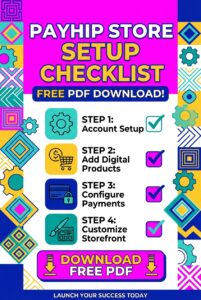
And if you want to keep this checklist handy while building your store, save or download the free PDF version for easy reference.
1. Choose What You’re Selling
Before you start building your store, decide exactly what you’re selling.
Your digital product could be an SVG bundle, printable, template, ebook, course, workbook, planner, or another downloadable product.
Ask yourself:
- Who is this product for?
- What problem does it solve?
- What will the customer receive?
- Why would someone pay for it?
Having clear answers will make the rest of your store setup much easier.
2. Create Your Payhip Store
Once your product is ready, it’s time to set up your Payhip store.
Payhip provides a dedicated storefront where customers can browse and purchase your products. You can also customize your store’s colors, fonts, pages, and sections using the Store Builder.
Checklist:
☐ Create your Payhip account
☐ Choose your store name
☐ Set your store URL
☐ Add your branding
☐ Update your About section
☐ Review your store on desktop and mobile
3. Connect Your Payment Processor
You need to make sure customers can actually pay you.
Payhip supports connecting payment processors such as PayPal and Stripe.
Before launching, verify that your payment account is connected and ready to accept transactions.
Don’t wait until you’ve announced your launch to discover that your payment setup isn’t complete.
4. Add Your Digital Products
Now upload your products to Payhip.
When adding a digital product, Payhip allows you to upload files, set a title and price, add a cover image, and write a product description. You can also add preview files and control product visibility.
Product checklist:
☐ Upload the correct file
☐ Add a clear product title
☐ Set your price
☐ Add a professional cover image
☐ Write a benefit-focused description
☐ Add a preview if appropriate
☐ Check product visibility
5. Make Your Product Page Sell
Your product page should quickly answer the customer’s biggest questions.
What is this?
Who is it for?
What will I receive?
How will it help me?
Instead of simply listing what’s included, explain the outcome your customer can expect from using the product.
For example, don’t just say, “Includes 25 SVG files.”
Explain what those SVGs can help the customer create and why the bundle saves them time.
6. Customize Your Store
Your store should feel like an extension of your brand.
Use your brand colors, consistent graphics, professional product images, and clear navigation. Payhip’s Store Builder lets you customize pages and add different sections to your storefront.
You don’t need an overly complicated website. You need a store that is easy to understand and easy to shop.
7. Test Everything Before Launching
This step is easy to skip—and one of the most important.
Go through your store like you’re a customer.
Check your product links, descriptions, images, pricing, checkout, and download experience.
Payhip allows you to test the checkout experience using a 100% off coupon so you can go through the purchasing and post-purchase process without making a real payment.
Make sure your digital product can be accessed successfully after purchase.
8. Prepare Your Launch Marketing
Your store can be completely ready and still make zero sales if nobody knows it exists.
Before launching your Payhip store, prepare your promotional content.
Create:
☐ Instagram posts
☐ Reels or TikToks
☐ Pinterest graphics
☐ Email announcements
☐ Blog content
☐ Product demonstrations
☐ Launch offers or discounts
Your marketing should focus on the problem your product solves—not just telling people that you have a new product.
Your Free Payhip Store Setup Checklist
Before you officially launch, run through this final list:
☐ Product finished
☐ Product files uploaded
☐ Product description written
☐ Price selected
☐ Product images completed
☐ Payment processor connected
☐ Store branding updated
☐ Store URL checked
☐ Product visibility confirmed
☐ Checkout tested
☐ Download tested
☐ Launch content prepared
☐ Store link added to your social profiles
If you’ve checked everything off, you’re ready to start sending potential customers to your store.
Ready to Launch?
A successful digital product store doesn’t have to be complicated. The goal is to create a professional shopping experience that makes it easy for customers to understand your products and complete their purchases.
If you’re ready to build your store, get started with Payhip.
And don’t forget to save this Payhip store setup checklist as your launch guide. Having a simple checklist can keep you organized, prevent missed steps, and make launching your digital product business feel much more manageable.